Blogger Tricks Blogger Templates

http://meng-kimtong.blogspot.com/

Natural Natural In Computer Lab In Computer Lab My Address: Street 11,05 Village,Sangkat Kampong Leav,Krong Prey Veng,Prey Veng Province,National road 11, (Prey Veng 14553 ),Cambodia
Headlines
Breaking News
Welcome for your visiting my Blogspot,Please have a good luck all time! ©

Monday, March 21, 2016

Computer Repairing Course


​រៀនជួសជុលកុំព្យូទ័រ

Computer Repairing Course


To be a PC repairman in a short time ,please start it with my course at Chea Sim University of Kamchaymear


អ្នកអាចបើកវីនដូដោយមិនមានហាតឌីស

1-ឈូសកុំព្យូទ័រតាមផ្លាស Installing Windows with USB Flash

2-បង្កើតផ្លាសប៊ូត វីនដូតាម How to create a Windows bootable USB drive  with

-cmd

-CMD ជាមួយកម្មវិធីផ្សេង (cmd with other apps)

-កម្មវិធីបង្កើតផ្លាសប៊ូត (bootable USB Apps)

-Multi Menu boot

3-ដោះលេខសម្ងាត់គណនេយ្យ អ្នកប្រើប្រាស់ វីនដូ(Remove Password of Account User )

4-តម្លើងកម្មវិធី ឲ្យមានអាជ្ញាបណ្ណពេញ (How to crack serial,patch,to get full license)

5-តម្លើង ដ្រាយវ លើផ្នែករឹង (Hardware Drivers Installing)

6-កម្មវិធីថែរទាំលើម៉ាស៊ីនកុំព្យូទ័រ ឲ្យដំណើរការមាន (How to boost your Computer's speed ,performance

 ស្ថេរភាព និងដើរលឿន    and Maintenance)

7-លួច Password Wifi  (Password Wifi  hacking)

8-ដោះ Password លើឯកសារ (How to remove password on word,excel,pdf,file)

9-ស្រង់យកឯកសារដែលបាន លុបចេញពីផ្លាស់ លុបចេញពីធុងសម្រាម

      លុបចេញពីដ្រាយណាមួយ ដោយចៃដន្យ(How to recovery your files from computer storage device)

ចូលរៀនថ្ងៃទី           ៖​​​

បន្ទប់សិក្សា              ៖

ម៉ោងសិក្សា             ៖

ទំនាក់ទំនងចុះឈ្មោះ ៖ ​ 012 395815

Thursday, March 10, 2016

Ant Dictionary

របៀបបញ្ចូល វចនានុក្រម Ant ដោយមិនបាច់តម្លើងដោយផ្ទាល់

How to install Ant Dictionary without installing


១-សម្រាប់ ANT Dictionary 2010 V1.02

 ក-អ្នកអាចថតចម្លងពីម៉ាស៊ីនផ្សេងដែលបានតម្លើងវារួច នូវថតឯកសារចំនួន៤ តាមរូបភាព
ខាងក្រោម ពីទីតាំង  C:\Users\USER ACCOUNT NAME\AppData\Roaming
(ឧទាហរណ៍ សម្រាប់ម៉ាស៊ីនខ្ញុំ គឺ C:\Users\MENG KIMTONG\AppData\Roaming)
យកទៅដាក់ក្នុងម៉ាស៊ីនរបស់អ្នក តាមទីតាំង ឈ្នោះគណនីម៉ាស៊ីនរបស់អ្នក ដូចដែលអ្នកបានថតវាចេញដែរ។


ខ-បន្ទាប់ពីបានថតចម្លងរួចសូម ចូលទៅថតចម្លង ថតឯកសារ ANT Dictionary 2010 V1.02ពីទីតាំងមួយទៀត ៖
    -បើម៉ាស៊ីន 64 bit ទីតាំងវាគឺ  C:\Program Files (x86) រួចរកមើល ថតឯកសារ ANT Dictionary 2010 V1.02ដើម្បីថតចម្លងចូលម៉ាស៊ីនរបស់អ្នកដូចគ្នាដែរ។
   -បើម៉ាស៊ីន 32 bit ទីតាំងវាគឺ   C:\Program Files រួចរកមើល ថតឯកសារ ANT Dictionary 2010 V1.02ដើម្បីថតចម្លងចូលម៉ាស៊ីនរបស់អ្នកដូចគ្នាដែរ។
 
 
2-សម្រាប់ ANT Dictionary 2011 V2

 ក-អ្នកអាចថតចម្លងពីម៉ាស៊ីនផ្សេងដែលបានតម្លើងវារួច នូវថតឯកសារចំនួន១ តាមរូបភាព
ខាងក្រោម ពីទីតាំង  C:\Users\USER ACCOUNT NAME\AppData\Roaming
(ឧទាហរណ៍ សម្រាប់ម៉ាស៊ីនខ្ញុំ គឺ C:\Users\MENG KIMTONG\AppData\Roaming)
យកទៅដាក់ក្នុងម៉ាស៊ីនរបស់អ្នក តាមទីតាំង ឈ្នោះគណនីម៉ាស៊ីនរបស់អ្នក ដូចដែលអ្នកបានថតវាចេញដែរ។


ខ-បន្ទាប់ពីបានថតចម្លងរួចសូម ចូលទៅថតចម្លង ថតឯកសារ ​​ANT Magazine ពីទីតាំងមួយទៀត ៖
    -បើម៉ាស៊ីន 64 bit ទីតាំងវាគឺ  C:\Program Files (x86) រួចរកមើល ថតឯកសារ ANT Magazineដើម្បីថតចម្លងចូលម៉ាស៊ីនរបស់អ្នកដូចគ្នាដែរ។
   -បើម៉ាស៊ីន 32 bit ទីតាំងវាគឺ   C:\Program Files រួចរកមើល ថតឯកសារ ​​ANT Magazineដើម្បីថតចម្លងចូលម៉ាស៊ីនរបស់អ្នកដូចគ្នាដែរ។


Sunday, March 6, 2016

Using CMD to create bootable Windows USB drive

របៀបបង្កើតផ្លាសប៊ូត ជាមួយ CMD (command prompt )

How to create a bootable Windows USB drive With CMD
To make a bootable USB drive for Windows Vista or Windows 7, 8,8.1 and 10 ,you need to have
       1-Windows iso Files type (image files)
       2-USB drive with capacity  8 Gb


  Then follow each step below:
1-Plug in USB drive to your computer

2-Open Windows command line window by clicking Start, typing in cmd in the search and select Run as Administrator by press

then press YES

 
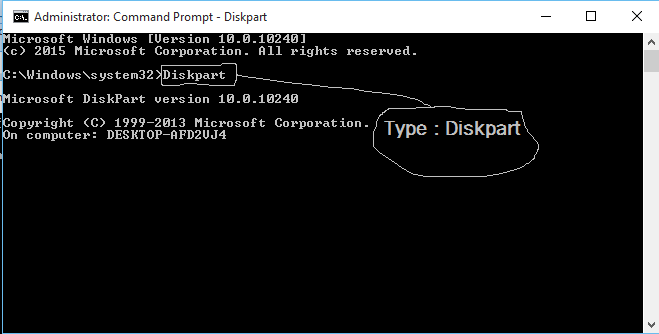
3-type DISKPART, then  press Enter

 
4-Type LIST DISK and press Enter.


5-Find the disk number of your USB drive  type SELECT DISK [USB disk #]
(for my picture is Disk 1)
 
6-CLEAN
 

7-CREATE PARTITION PRIMARY


8-SELECT PARTITION 1

9-ACTIVE
 
10-FORMAT FS=NTFS   (please wait until It finishes)
 
11-ASSIGN
 
12-EXIT
 
13-Mount the Windows ISO File to the virtual drive / insert Windows DVD  into CD room drive 
 
14-Go back to the command prompt window and type in D: CD BOOT (substitute your DVD drive letter for "D:" / Virtual drive ) and press Enter. Type CD BOOT again and press Enter.
 
15-type BOOTSECT.EXE /NT60 H: (substitute your USB flash drive letter for "H:"
 

16- Copy All Files in the Windows iso into your USB drive
 
17- Try boot your USB to set up window


Thursday, March 3, 2016

Rufus Create bootable USB drives


បង្កើត​ផ្លាសប៊ូតវីនដូជាមួយនឹង Rufus

 
Create bootable USB drives the easy way with RUFUS
កម្មវិធី​ ជាកម្មវិធីដែលពិសេសជាងកម្មវិធីផ្សេងៗទៀតក្នុងការបង្កើតនូវ ផ្លាសប៊ូតប្រព័ន្ធប្រតិបត្តិការដែលលឿនជាងកម្មវិធីដ៏ទៃទៀត


Download

 
Windows 7 USB/DVD Download Tool v1.0.3000:08:10
Universal USB Installer v1.8.7.500:07:10
UNetbootin v1.1.1.100:06:20
RMPrepUSB v2.1.63800:04:10
WiNToBootic v1.200:03:35
Rufus v1.1.100:03:25
 

Wednesday, March 2, 2016

Ace Utilities Version: 6.1.0

កម្មវិធី Ace Utilities  V.6.1.0

Ace Utilities ជាកម្មវិធីសម្រាប់ធ្វើឲ្យកុំព្យូទ័ររបស់អ្នក ដើរលឿន វាអាចបង្កើនល្បឿន សម្អាត និង​ ធ្វើឲ្យកុំព្យូទ័ររបស់អ្នកមានតុល្យភាព


1-->Download

2--->Download


My facebook Page

Blogger Tips and TricksLatest Tips For BloggersBlogger Tricks

My Photo Profile

Powered by Blogger.

ផ្នែកដែលបានជ្រើសរើស

Blogger news

បញ្ជីតាមផ្នែក Category List

Recent Posts

About